The answers before the board meeting.
Support, switching, refunds, chargebacks, failed payments, clearances and reports: what Pulse does, in plain words. We reply within one working day, Monday to Friday.
Support from a person.
We reply within one working day, Monday to Friday. Email support@pulse-fc.app, or use Help at the foot of the front office menu: it emails us with your club already filled in.
When you switch, we set up your first program with you and check your import together. The help center answers the common questions any time.
The help centerSetting up payments
Payments go into your club’s own Stripe account. Stripe asks for:
- The club’s legal name, address and tax ID (EIN)
- The club’s bank account for payouts: routing and account numbers
- One named person who represents the club, usually the treasurer or president: their own legal name, date of birth, home address and, in the US, the last four digits of their Social Security number. Stripe may also ask for a photo of their ID
Best done by your treasurer or president, because Stripe asks for that person’s own details (they go to Stripe, not to Pulse). If that isn’t you, invite them as an Admin first and let them connect. You can stop part-way and pick it up later.
What moves, and what doesn’t.
Send us your spreadsheets in whatever shape they’re in. We bring the people and the schedule across free; the rest families confirm when they register, so the records start clean.
Live in 7 days. Once we have your program details and Stripe has approved your account, your first registration is live within 7 days.
Switching, in detail| Record | When you switch |
|---|---|
| Teams | Moves, free |
| Players | Moves, free |
| Parents’ names and emails | Moves, free |
| Coaches | Moves, free |
| Schedules | Moves, free |
| Phone numbers and home addresses | Doesn’t import: families add or confirm them when they register |
| Medical details, documents and signed waivers | Doesn’t import: families upload once, then they carry over to next season |
| Clearance records | Doesn’t import: log each adult’s current documents, or coaches upload them from the app |
| Outstanding balances and running payment plans | Don’t import: finish them where they started, and start new programs on Pulse |
| Payment history and league IDs | Don’t import: keep your old system’s export for your records |
Refunds, chargebacks and failed payments.
Refunds
Refund in full or part from the payment, or one installment of a plan. Refunds above a limit you set need a second person to approve. Pulse keeps its 1% when you refund a payment, and Stripe keeps its processing fee; families are told before they pay.
Refunds and disputesChargebacks
A dispute arrives in your club’s own Stripe account and your administrators and treasurer are alerted, with the date your answer is due. Stripe’s dispute fee ($15 at its published US rate) is charged to the club.
Failed payments
A saved card is tried 3 times, 3 days apart. Then autopay stops, the family is emailed (once when it first fails, once when it stops) and your staff are alerted. Who owes shows it with the reason in plain words.
Failed payments and autopayClearances, with expiry reminders.
One record per adult: coaches, team managers, regular volunteers and the board. Background check, SafeSport and concussion training by default; you set what each role needs and when it renews, including your state’s rules (Pennsylvania’s Act 153 clearances, for example).
Pulse emails a reminder 60 days and 14 days before a document runs out, and checks clearances whenever a coach is assigned. Pulse tracks clearances; it doesn’t run the checks.
Clearances and SafeSport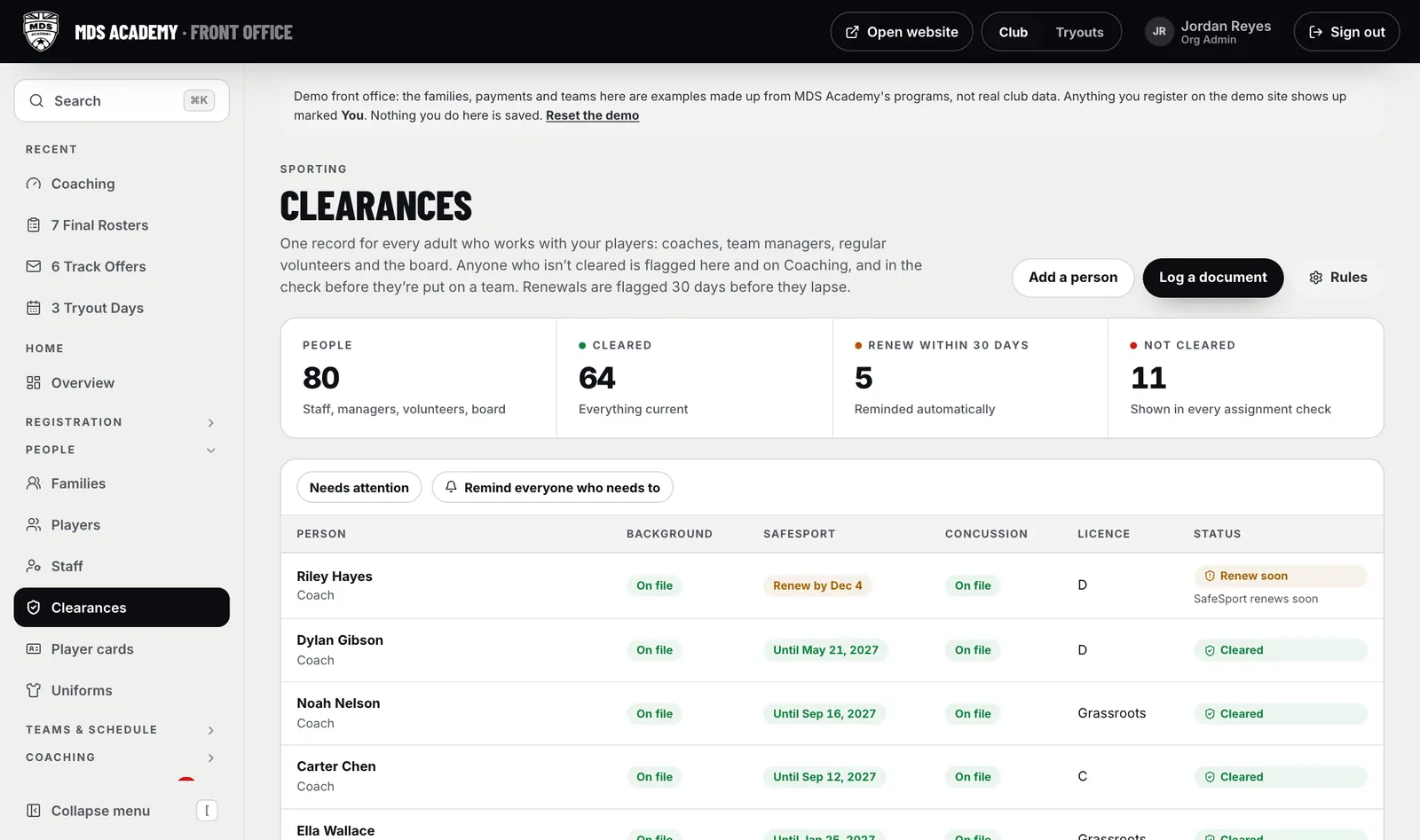
Reports and downloads.
Registrations
Every registration with its answers and files, filtered by program, status or team, and downloadable.
Who owes
Owed by age (not due yet, 0–30, 31–60, 61–90, 90+ days) and by location, downloadable as a spreadsheet.
The board report
Collected, refunded, still to collect, aid against its budget, and what the website brought in. Print or save as a PDF.
The QuickBooks journal
One balanced entry per payment and deposit, plus a monthly summary, still owed and deferred revenue.
Your data
Players, fees and payments from Settings, whenever you like (family contacts and events too); other records on request.
GotSport
Your players in GotSport’s own 13 columns, with what’s missing listed first.
Administrator questions.
Do you publish support hours?
No. We promise a reply: we reply within one working day, monday to friday.
Can families without the app do everything?
On the web, any phone can see every child’s schedule together, RSVP, follow live scores, sign forms and pay. Chat and phone notifications need the app.
How do waivers and league forms work?
Add your waivers once and require them on a program or team. Upload your state association’s or league’s own PDF (for example NJYS or US Club, or any other) and families e-sign it by link.
What can we download if we leave?
Players, family contacts, fees, payments and events from Settings, any time; ask us for your other records.
See your club on Pulse.
Send us your website. We’ll build your club’s website and front office by hand and email you the link within 48 hours.