Help center
How Pulse works, in plain words.
For families, for club staff weighing Pulse up, and for clubs already on it. We reply within one working day, Monday to Friday. Email support@pulse-fc.app.
Any phone
No app? Use Pulse on the web.
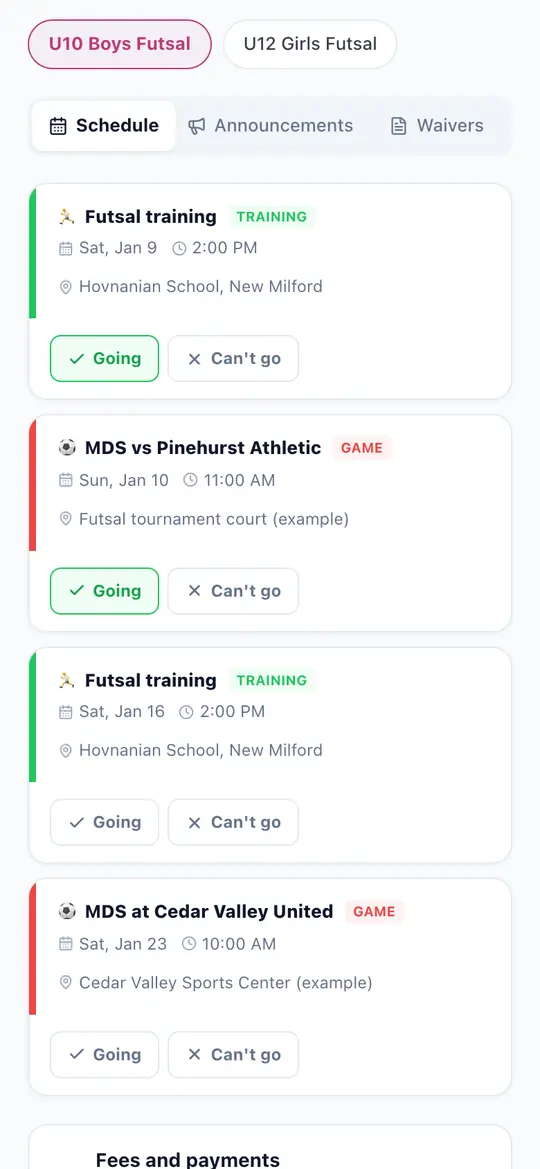
Every family can use Pulse in their phone’s web browser, iPhone or Android, with the same account as the app. Sign in at pulse-fc.app/login with the email your club has, by password or a one-time link.
- Needs you: fees, forms and invites waiting for you, the most urgent first.
- Every child’s schedule together, with Going or Can’t go for each child and a warning when two events clash.
- Live scores while your child’s game is being scored.
- Announcements from the coach and the club.
- Waivers and forms to sign, your league’s own forms included.
- Fees and payment plans, paid online.
Team chat and phone notifications need the app. Without it, families are emailed when an event changes.
Families
No app? Use Pulse on the webAny phone, iPhone or Android, can see the schedule, reply for each child, sign forms and pay on the family page.Two children on two teams, one login, both parentsOne account holds every child you look after, on any team. Each parent has their own login and sees the same.Live scores for parentsA parent at the field keeps the score; everyone else follows the score, the clock and every goal.Muting a chat, and choosing your notificationsQuieten one busy chat for 8 hours, a week or until you turn it back on, and pick which notifications reach your phone.Waivers, documents and e-signed league formsClub waivers, your state association’s and league’s forms signed by link, and documents that carry over.
Coaches
Running your club
Setting up registrationMake a program, set its ages, price and places, open registration, and see who signed up.Running tryoutsSeven steps, from Get Ready to Final Rosters: sign-ups, tryout days, rankings, teams, offers and rosters.UniformsHow your club handles uniforms, personal vendor links, order reminders and shirt numbers.Importing teams, players and parentsUpload a spreadsheet or PDF and AI Import adds your teams, players and parents, then emails each family an invite.
Money
What families see at checkoutOne price that includes the fees, or exactly your listed price. Your club’s choice.Card and bank fees, refunds and disputesStripe’s standard rates, nothing added; what a refund returns; what happens when a family disputes a payment.Failed payments and autopayThree tries, three days apart, then autopay stops and the family is told.Setting up payments with StripeWhat Stripe asks for, and who at your club should do it.Payment plansMonthly payments, payments on dates you choose, the first payment on its date, and plans after tryouts.Refunding a paymentRefund in full or part from the payment itself; above a limit, a second person approves.
Club setup
Clearances and SafeSport trackingOne record per adult, only cleared adults on teams, imports from SafeSport, NCSI and JDP, and expiry reminders.Exporting your dataWhat you can download yourself, any time, and what we hand over on request.Who can see your club’s dataYour club, and Pulse’s support role when it’s helping you. MDS Academy never does.The GotSport exportYour players in GotSport’s own 13 columns, ready for its player upload.Staff roles and permissionsAdministrators, coaches and four office roles: what each one sees, money limits, and how to give a role.Editing your websiteChange your site’s words, dates, photos and news yourself; Pulse FC looks after the design.
Families and account help
Forgotten password, joining your child’s team, a second parent, or deleting an account: see Support.
Security and your data
Where your club’s data is stored, who can see it, how long each kind is kept, and what we do if something goes wrong: see Security.